Explore All Blog Categories
Personal
Marketing
Fonts & Colors
Web Design
Blog Home
Personal
Marketing
Fonts & Colors
Web Design
blog Home
Why Your Website Design Matters
Most businesses don’t design a website to look exactly like everyone else’s. They design websites to reflect their unique aesthetic and brand style.
Your website should let potential clients know what it’s like to work with you. Are you fun and outgoing? Deeply rooted in tradition? What services do you offer? What sets you apart from the competition? Your website design helps convey the answers to these questions.
The Big Question: Can Templates Really Be Customized?
But can you really do that when you start from a template?
I think the answer is yes, absolutely! In fact, the Blue House Creative Company website started as a template. Now before we dive into exactly how I customized this template, let me introduce myself.
Meet Emily
Hi! I’m Emily, a website designer who designs and customizes Showit websites and website templates. I work with creative service providers and wellness service providers.
My Starting Point
My website started as a template by Davey & Krista, the Edisito. It was designed for “creatives, service providers, and personal brands who want a site that’s polished but approachable.”
How I Made It My Own
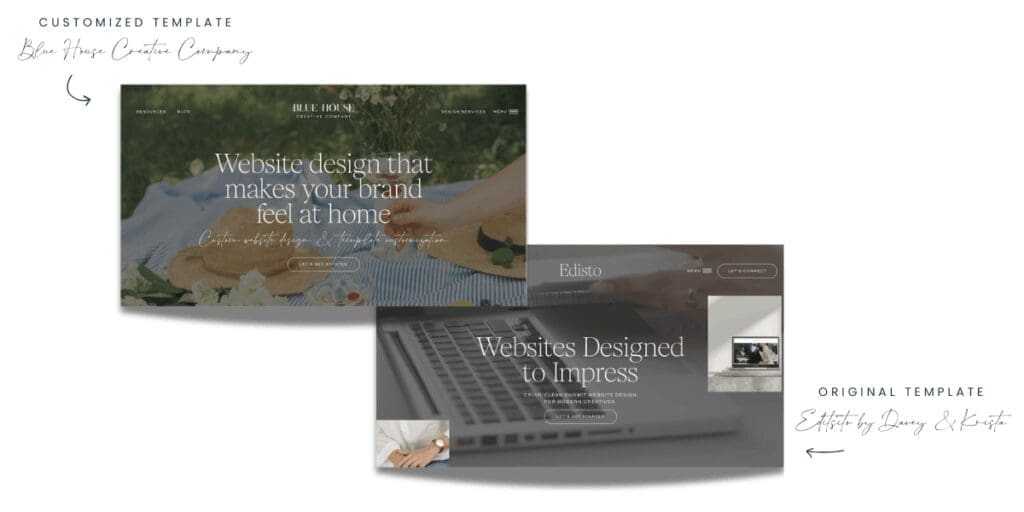
So how did I make it my own? I changed the colors and added a new font. I edited page layouts. Of course, I added my own photos, media, and copy.
In this blog post, I’ll walk you through each of these changes. You’ll see how I made this template my own.
Changing Colors & Fonts
Transforming the Color Palette
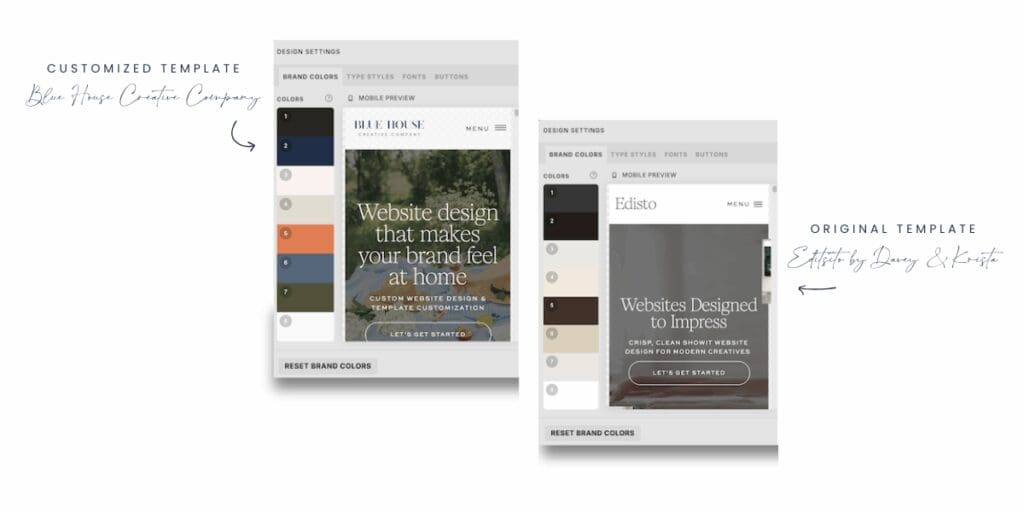
Changing colors and fonts can dramatically transform a template. These changes make it look like it was designed exclusively for you.
In this customization example, the original template color palette was exclusively neutral. It featured dark grays, browns, and beige. I updated the color palette to reflect my brand’s colors and personality. Dark navy blue is contrasted with orange and pink, and I used dark brown, beige, and white for neutrals.
I kept the existing fonts because they’re a great mix of serif and sans serif fonts licensed from Jen Wagner. I added a handwritten script font licensed from Sans and Sons as an accent and a way to infuse more personality.
Learn More About Design Elements
Want to learn more about choosing colors and fonts? Check out my blog posts Choosing Your Website Colors and Font Pairing Formulas for more information on getting your colors and fonts right.
Editing Page Layouts
The Add and Subtract Method
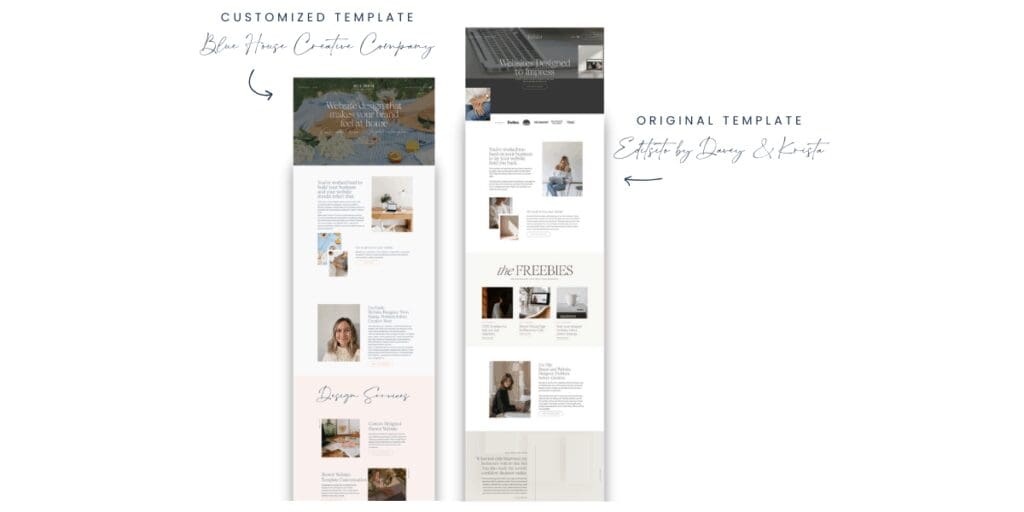
To make a website template your own, you need to add what your business needs and subtract what you don’t. The original template had more on each page than I needed. I removed what wasn’t relevant while keeping the design integrity intact.
Understanding Design Balance
What does that mean? Every design has a balance of colors, textures, shapes, and visual weight. Removing too much can disrupt the design flow. Keeping this balance in mind when editing page layouts is important.
Adding New Content Strategically
The same principle applies when adding new sections. If you pile on more and more content without considering the page flow, it can end up looking like a run-on sentence. You might add more information. But if your content doesn’t flow with the rest of your website, it’s actually hurting your message rather than helping it.
Adding Photos & Media
Choose Photos Intentionally
Adding your own photos and media is one of the most impactful ways to transform a template. It makes the template feel uniquely yours. While it may be tempting to use every single photo from your brand shoot, it’s important to maintain the template’s design flow. Choose your photos intentionally.
Create Visual Cohesion
Choose photos that make sense together. Select images that work well with the message of each page of your site.
Putting it all together
Templates Are Only as Limited as Your Creativity
The truth is, a website template is only as limited as your creativity. With intentional customization, you can transform any template. Use thoughtful color and font choices. Make strategic layout edits. Select photos carefully. Consider adding custom pages.
You can create a website that truly reflects your brand’s personality and values.
Your Template Is Just the Starting Point
Your template is just the starting point. What you do with it determines whether it becomes just another cookie-cutter site. It could become a unique digital home for your business instead.
The key is being intentional about every change you make. Ensure each edit enhances rather than disrupts the original design flow.
Ready to Get Started?
Need help with your own template customization? Check out my design services. Want to try a Showit website template for free? Download my free Launching Soon website templates to see what Showit website templates are all about.
Templates are amazing tools. They can speed up your website launch timeline. They give you a custom-designed look at a lower investment than custom design.
Have we met yet?
Because I think WE Should be friends
Hi! I'm Emily. I'm a stay-at-home mom who accidentally learned web design while growing my side hobby. When I wanted a website for the Etsy shop I was outgrowing, I realized that learning how to do-it-myself was way more fun than anticipated. And that's how Blue House Creative Company began.
Explore All Blog Categories
Personal
Marketing
Fonts & Colors
Web Design
Blog Home
Personal
Marketing
Fonts & Colors
Web Design
blog Home
Here's What to Read Next
Fonts & Colors
9 Elegant Google Fonts You’ve Probably Never Heard Of
WEb Design
Basic SEO Website Design Tips for Your Showit Website
Web Design
What to Look for in a Showit Website Template
Fonts & Colors
Handwritten Google Font Inspiration For Your Spring Projects


Explore categories
WEb Design
Fonts & Color Inspo
Marketing
blog Posts to binge & save
Explore Catagories
From web design basics, design inspiration, digital marketing tips and tricks i've learned along the way, to the personal posts that let you know you are not alone. It's all here.
Personal

Take a freebie
One full landing page
Free Landing Page Template
Help is on the way!
Free Bio Links Template
Start Here
Free Launching Soon Template
All of the Freebies
Pick one or pick them all
Are you ready for a new website? Or maybe ready for your first website? These freebies will get you started without the overwhelm on a full website. A Launching Soon Page, a Links Page, and a Landing Page. All ready for you.


